
Getting Started with Multi FileFeeds
An overview of how to set up a OneSchema Multi FileFeed.
A Multi FileFeed (MFF) is a recurring file-ingestion pipeline. It pulls inbound files from a source (SFTP, S3, Google Sheets, manual upload, or an API endpoint), runs them through a configurable sequence of transforms (extract, clean, validate, enrich), and writes structured rows to a destination such as your SFTP server, S3 bucket, or GCS bucket.
When new files arrive, the MFF runs automatically, applies its transforms in order, validates each row against a OneSchema Template, and emits an audit log of which rows were accepted, transformed, or rejected.
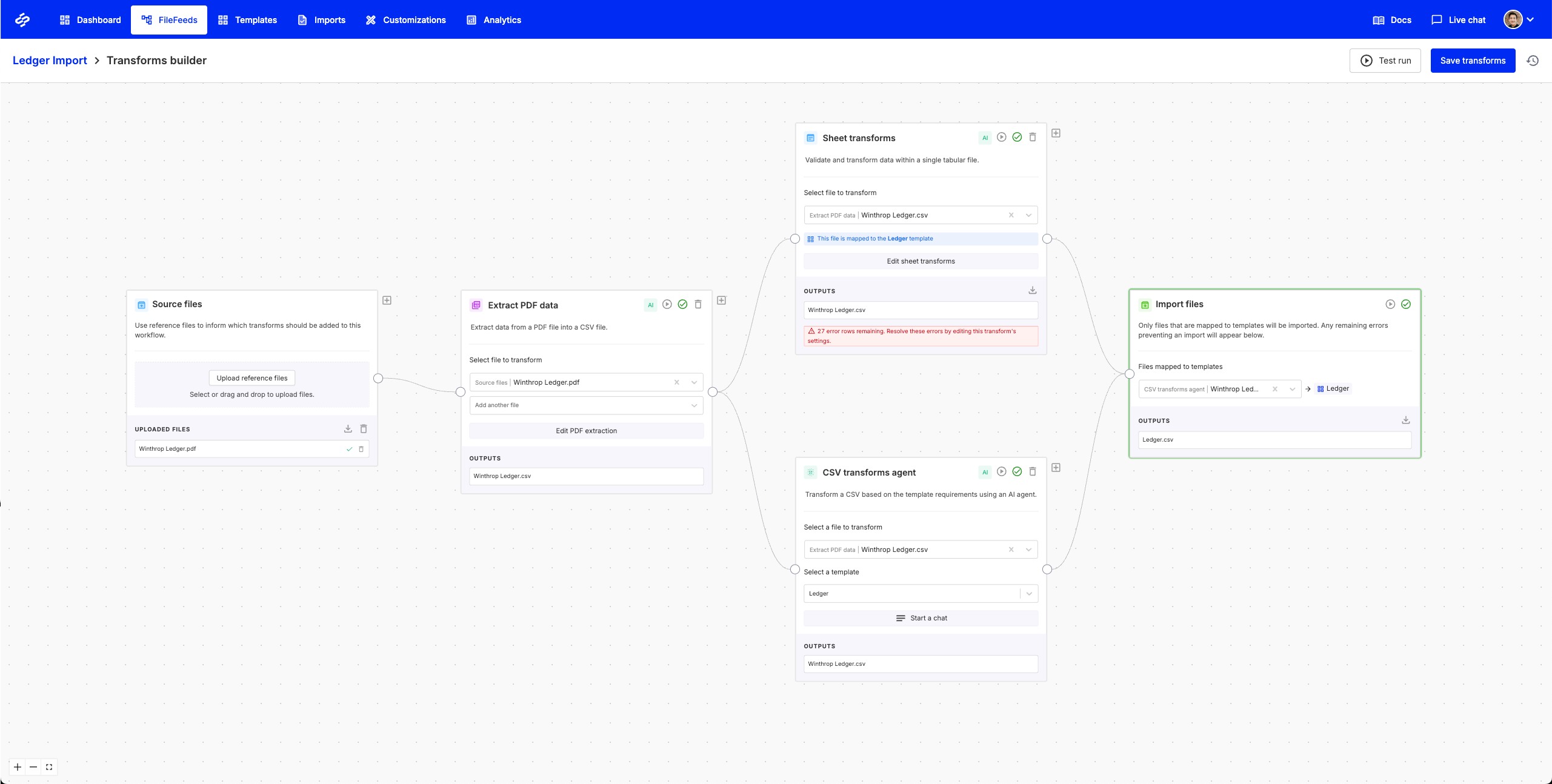
Transforms are authored in the transform builder, shown above. You can configure them visually, record them from example edits, or generate them from natural-language instructions. The transform graph is version-controlled, so every change to a Multi FileFeed is reviewable and reversible.
What you can build with a Multi FileFeed
- Any file in, clean rows out. Native support for CSV, Excel, PDF, Word, JSON, XML, ZIP, and more, including merged cells, multi-table sheets, and PGP-encrypted files.
- Validate against your schema. Every row is checked against a OneSchema Template (your single source of truth for column names, types, and business rules), with 50+ built-in validations and code hooks for anything custom.
- Connect to where data already lives. SFTP, S3, Google Sheets, and your API are all first-class sources, with SFTP, S3, and GCS as supported destinations. AWS Secrets Manager and Azure Key Vault are supported for credential storage out of the box.
- Agents that read intent, not instructions. Show an agent a sample file and it infers the right transform (header detection, column mapping, value cleanup, taxonomy classification, error fixes) without step-by-step prompts. The agent only pulls your team in for the rows or fields it can't confidently handle, so human judgment is reserved for the cases that actually need it. Every action lands in a transparent, observable run history.
Who Multi FileFeeds is for
Multi FileFeeds was built to give every implementation, operations, and customer success team an AI-powered data engineer on staff, and to save engineering from owning yet another integration script.
Read on for the core concepts, then follow the Build your first Multi FileFeed walkthrough to ship a working MFF in five minutes.
If you don't yet have a OneSchema account, request a demo to get one provisioned.
Updated 4 months ago